Title here
Summary here
Adaptyst intermediate representation change
Last update: 25 March 2026
We are changing the intermediate representation used by Adaptyst from SDFGs to MLIR. See the announcement here.
The first stage of this switch is already live: DaCe is no longer a dependency of Adaptyst and the internals of the tool have been rewritten to accommodate the future MLIR integration while providing higher API stability for module developers.
The single-command-analysis mode currently uses neither SDFGs nor MLIR: later, there will be also the MLIR version of it. Both variants will stand on an equal footing and be maintained.
You are free to continue working on ALL parts of your module once you implement the IR-abstracting Adaptyst API changes made by us: no more breaking API changes are foreseen for finalising the MLIR integration.
System/hardware modules are responsible for analysing a workflow intermediate representation (IR) in the context of a specific component or its part in a system graph. They describe how the component should be modelled/profiled and can provide optional information of interest to a user such as profiling results.
Currently, all outputs produced by modules should be saved to disk using the Adaptyst module API explained in the following section. These outputs can be loaded later in Adaptyst Analyser using its module API described in the Adaptyst Analyser implementation section. The same API allows for developing a custom UI for inspecting the outputs.
In the future Adaptyst versions, the modules will also play a significant role in the software-hardware co-design goal of the tool, i.e. determining how well an IR or part of it matches a specific system component or its part (e.g. whether a specific code segment is more suitable for a CPU or a GPU). The documentation will be updated accordingly as the R&D work on this progresses.
Compatibility of changes to modules due to R&D work
The changes planned to be made to modules as part of the R&D work explained above will be backward compatible.
API stability
We try to keep our APIs as stable as possible already now, but due to the early development stage of Adaptyst, we cannot guarantee the stability yet.
However, all breaking changes are announced in advance. If there are any breaking changes in a new update, they are announced at the release time or earlier (it’s unfortunately difficult to anticipate these changes in advance at the moment). If you use Adaptyst / Adaptyst Analyser APIs,
let us know: by staying in touch with us, we can ensure that the impact of any API changes on your work is minimised.

As shown in the figure above, all modules are implemented
in form of a shared library linking against libadaptyst.so containing
the Adaptyst module API. The C interface is used. In turn, libadaptyst.so
loads modules dynamically through dlopen(), using the
lib<MODULE NAME>.so file located inside the <MODULE NAME> folder in
the <user install prefix>/opt/adaptyst/modules module path (e.g. in case of linuxperf,
the full shared library path is /usr/opt/adaptyst/modules/linuxperf/liblinuxperf.so
by default if a user has installed Adaptyst into /usr).
Defining installation of modules for Adaptyst
There is no pre-defined standard for installing modules for Adaptyst, so you are expected to provide users with installation instructions of your module.
Note that this is not the case for Adaptyst Analyser, see the Adaptyst Analyser implementation section.
Module path changes
The <user install prefix>/opt/adaptyst/modules path can be changed by a user,
either during Adaptyst compilation or through the ADAPTYST_MODULE_DIRS runtime environment variable.
Therefore, it is crucial to:
ADAPTYST_MODULE_PATH variable in CMake when
importing the Adaptyst CMake target, see below),adaptyst_get_library_dir() API method to get the module path in your code (alternatively:
check the value of ADAPTYST_MODULE_DIRS at all points where you refer to the module path or
make all module-path-dependent variables changeable by the user through module options).When Adaptyst is installed, libadaptyst.so and the header files are copied to the usual
library and include directories unless specified otherwise. At the same time,
the adaptyst::adaptyst CMake target for libadaptyst.so and
the header files is created automatically. To use it, put e.g. these two lines in your
CMakeLists.txt file:
find_package(adaptyst REQUIRED)
target_link_libraries(example PUBLIC adaptyst::adaptyst)
The CMake target also makes available the ADAPTYST_MODULE_PATH variable storing the
module path (i.e. <user install prefix>/opt/adaptyst/modules by default). One example of its usage is
the following:
find_package(adaptyst REQUIRED)
set(INSTALL_DIR "${ADAPTYST_MODULE_PATH}/my_module")
The shared library must implement the following C functions:
// These two lines are REQUIRED.
#define ADAPTYST_MODULE_ENTRYPOINT
#include <adaptyst/hw.h>

// Called once when a module instance is initialised by
// Adaptyst (there may be several module instances within
// an entity up to the limit defined in max_count_per_entity).
//
// Use the value of the "module_id" parameter in all Adaptyst
// API calls requiring an ID of type amod_t.
//
// The return value indicates whether the initialisation
// has succeeded.
bool adaptyst_module_init(amod_t module_id) {
    return true;
}

// Called when a module instance is expected to process
// a workflow IR stored in the "ir" parameter.
// It is up to the module to decide what parts of the IR to
// process. Adaptyst module API methods should be used for
// saving module outputs.
//
// The type of the "ir" parameter is a C struct compatible
// with many different IR types: see the
// Doxygen documentation of adaptyst/hw.h to see how it
// is structured.
//
// Use the value of the "module_id" parameter in all Adaptyst
// API calls requiring an ID of type amod_t.
//
// This function is guaranteed to be called after
// adaptyst_module_init().
//
// The return value indicates whether the module
// has successfully processed the IR.
bool adaptyst_module_process(amod_t module_id, ir workflow) {
    return true;
}

// Called once when a module instance is finalised/closed
// by Adaptyst.
//
// Use the value of the "module_id" parameter in all Adaptyst
// API calls requiring an ID of type amod_t.
//
// This function is guaranteed to be called last.
void adaptyst_module_close(amod_t module_id) {

}

// Called when a workflow calls adaptyst_region_start()
// (see "Running Adaptyst" -> "Code regionisation"),
// with the following arguments:
// * module_id: use its value in all Adaptyst API calls requiring
//   an ID of type amod_t.
// * name: the name of the region as passed to adaptyst_region_start().
// * part_id: a string indicating what part of the workflow
//   adaptyst_region_start() has been called in. At the moment,
//   it is always in form of "<PID>_<TID>" where <PID> and <TID>
//   are the process and thread ID respectively.
// * timestamp_str: a string representing the timestamp of the
//   adaptyst_region_start() call in nanoseconds, it's "-1" if
//   undefined/unknown.
//
// The return value indicates whether the module has processed
// the region start successfully.
bool adaptyst_region_start(amod_t module_id, const char *name,
                           const char *part_id, const char *timestamp_str) {

}

// Called when a workflow calls adaptyst_region_end()
// (see "Running Adaptyst" -> "Code regionisation"),
// with the following arguments:
// * module_id: use its value in all Adaptyst API calls requiring
//   an ID of type amod_t.
// * name: the name of the region as passed to adaptyst_region_end().
// * part_id: a string indicating what part of the workflow
//   adaptyst_region_end() has been called in. At the moment,
//   it is always in form of "<PID>_<TID>" where <PID> and <TID>
//   are the process and thread ID respectively.
// * timestamp_str: a string representing the timestamp of the
//   adaptyst_region_end() call in nanoseconds, it's "-1" if
//   undefined/unknown.
//
// The return value indicates whether the module has processed
// the region end successfully.
bool adaptyst_region_end(amod_t module_id, const char *name,
                         const char *part_id, const char *timestamp_str) {

}
Additionally, it must define the following constants/variables in the global scope:
// The human-friendly name of a module.
volatile const char *name = "MyModule";

// The human-friendly version of a module.
volatile const char *version = "1.0.0";

// The non-negative version numbers of a module, with
// the last element being negative (-1 is standard here).
//
// Note that the last element is always ignored, it is used only
// for indicating the end of the array.
//
// At least one non-negative number must be defined.
//
// Version comparisons are done lexicographically,
// e.g. { 3, <anything> } > { 2, <anything> },
// { 3, 2, <anything> } > { 3, 1, <anything> },
// { 11, 2, -1 } > { 11, -1 },
// { 12, 5, 3, -1 } > { 12, 4, 88, -1 } etc.
//
// Please bear in mind that {<xyz>, 0, ..., 0, -1} > {<xyz>, -1},
// where <xyz> is any combination of non-negative numbers and
// the number of zeroes on the left-hand side is anything greater
// than or equal to 1.
volatile const int version_nums[] = { 1, 0, 0, -1 };

// The maximum number of instances of a module that can be
// spawned in an entity. 0 means unlimited.
//
// This constant is optional, the default value is 0.
volatile const unsigned int max_count_per_entity = 0;

volatile const char *options[] = {
    // The names of all user-settable options provided by
    // a module, with the last element being NULL.
    NULL
};

volatile const char *tags[] = {
    // The module tags that will be attached
    // automatically to a node, with the last element
    // being NULL.
    //
    // Tags can be used for a variety of reasons,
    // e.g. to verify whether a GPU module is attached
    // to a node that is connected with a CPU node.
    //
    // All tags used by a module are public-facing
    // and thus must be visibly documented to the outside
    // world, especially if a module is closed-source.
    NULL
};

volatile const char *log_types[] = {
    // The names of all types of logs that a module
    // can produce, with the last element being NULL.
    NULL
};

// Each option XYZ can accept either a single or an array value, NOT both.

// *** For each option XYZ in the "options" array with a single value: ***

// Help message, required.
volatile const char *XYZ_help = "XYZ help message";

// Option value type, required.
volatile const option_type XYZ_type = UNSIGNED_INT;

// Default option value, optional (the option becomes
// required to be set by a user if this is not provided).
//
// The type of this constant is determined by the value
// of XYZ_type. See the Doxygen documentation of
// option_type for matchings between option_type values
// and C types.
volatile const unsigned int XYZ_default = 1;

// *** For each option XYZ in the "options" array with an array value: ***

// Help message, required.
volatile const char *XYZ_help = "XYZ help message";

// Value type of every option array element, required.
volatile const option_type XYZ_array_type = UNSIGNED_INT;

// Default option value, optional (the option becomes
// required to be set by a user if this is not provided).
//
// The type of this array constant is determined by the value
// of XYZ_array_type. See the Doxygen documentation of
// option_type for matchings between option_type values
// and C types.
volatile const unsigned int XYZ_array_default[] = {};

// Number of elements in the default option value, required
// if XYZ_array_default is set.
volatile const unsigned int XYZ_array_default_size = 0;
You are very likely to use at least some Adaptyst module API functions in your
module: please consult the Doxygen documentation of the API
here.
All essential Adaptyst module API functions compatible with C can be found in the
adaptyst/*.h files. Similarly, extra Adaptyst module API features
compatible with C++20 (not C) can be found in the adaptyst/*.hpp files.
Technically speaking, modules are used in the Adaptyst flow in one of the two ways:
adaptyst_module_init() in the module. Then, in the
module, a call to the adaptyst_set_will_profile() API method is made to
indicate that the module will profile the workflow.adaptyst_module_process() in the module in a separate
thread.adaptyst_profile_notify()
API call that it is ready for profiling.adaptyst_module_close() in the module.adaptyst_module_init() in the module.adaptyst_module_process() in the module in a separate
thread.adaptyst_module_close() in the module.adaptyst_module_process() is always called in all modules within an entity in separate
threads, each with its own copy of an IR.
Adaptyst modules can also implement code that is executed inside a program
being analysed (as long as the program is compiled against libadaptyst_inject.so
and code regionisation is used), e.g. to inject some profiling libraries. For example,
nvgpu uses this functionality.
The documentation of this is coming soon!
AI assistance
Some textual parts of this section are AI-generated/AI-assisted. A human Adaptyst developer has verified everything here and made polishes wherever needed.
In contrary to the Adaptyst part of a module, the Adaptyst Analyser part has a pre-defined
directory structure and is installable by adaptyst-analyser:
| <root directory>
   | python
      | <module name>
         | __init__.py
         | ...
         | (Python files)
         | ...
   | web
      | <module name>
         | backend.js
         | backend.css
         | settings.html
         | settings.css
         | deps
            | ...
            | (extra .js/.cjs/.css files to be loaded by Adaptyst Analyser)
            | ...
   | metadata.yml
Because Adaptyst Analyser is a
Flask app, the Adaptyst
Analyser part of a module consists of two components: a server-side one in Python and a
client-side one in HTML/CSS/JavaScript/jQuery. The server-side files are stored in
python/<module name> and the client-side files are stored in
web/<module name> (the module name must be the same in both cases).
The general information about a module is stored in
metadata.yml.
Adaptyst Analyser JavaScript documentation
The remainder of this section assumes that you have looked at the Adaptyst Analyser JavaScript documentation.
The client-side component must have these files:
backend.js: a JavaScript file implementing at least the following (you can
use jQuery, elements from settings.html are available and can be used):// Called when a user double-clicks an analysable in a system graph
// (e.g. a node) and asks to open a specific module. This function should
// create a new window representing the starting point
// for exploring outputs produced by the module.
//
// Parameters:
// * entity_id (String): the ID of an entity of an analysable
// double-clicked by a user.
// * analysable_id (String): the ID of an analysable double-clicked
// by a user.
// * session (Object): a Session object corresponding to the
// currently-selected performance analysis session.
function createRootWindow(entity_id, analysable_id, session) {
}
// Called when an arrangement is loaded. This function should
// return a class whose getType() returns the same string as the
// one provided in the "type" parameter here. If the class
// can't be found, undefined should be returned.
//
// Parameters:
// * type (String): the type of a requested window class.
function getWindowClass(type) {
}
export { createRootWindow, getWindowClass };backend.css: a CSS stylesheet of HTML elements produced by backend.js.
If you want to apply CSS to parts of a window created by your module, you may want
to use one of the class names indicated by the diagram below, where <type>
is the return value of getType() in your JavaScript
Window-inheriting class.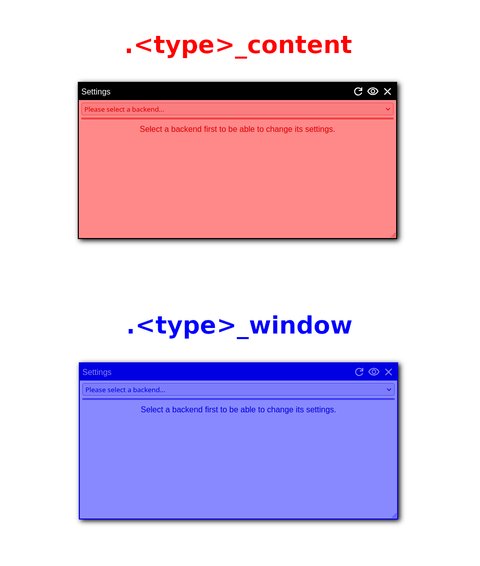
settings.html: an HTML file implementing a settings window of a
module. JavaScript functions from backend.js cannot be used. Settings widgets
to be used by backend.js must have IDs. It is highly recommended that the ID of
every element is prefixed by the name of a module, e.g. linuxperf_option123.
Otherwise, there may be conflicts between the IDs of elements from two different modules,
leading to an unexpected behaviour.settings.css: a CSS stylesheet of the settings window. If you want to
apply CSS to the content of the window, you may want to use
#<module name>_settings_block.Other files can be added if used by the above.
Important notes
backend.js, do not use IDs: use classes instead to distinguish
elements of your layout. This is because multiple windows with the same layout can be opened
at the same time by a user.backend.css, nest your classes in .<type>_content
or .<type>_window, do not put them in the global scope. Otherwise, there may be
conflicts between the class names of elements from two different modules or from a module
and the Adaptyst Analyser core, leading to an unexpected behaviour.The client-side component may also have the “deps” folder containing any extra .js, .cjs, and .css files to be loaded by Adaptyst Analyser (this is meant for JavaScript dependencies along with their CSS stylesheets if any). If you use it, please define all filenames expected in the directory in metadata.yml: see the metadata.yml part of the documentation later. Also, if you don’t want to store the files locally in “deps”, you can specify their HTTP(S) URLs in metadata.yml so that Adaptyst Analyser downloads them automatically when installing a module: again, see the metadata.yml documentation for more details.
Dependency conflicts
Both files stored in “deps” and files downloaded from metadata.yml URLs are installed into the same directory in Adaptyst Analyser.
If there are any name conflicts, a user will be given a choice of file version to keep when installing a module. It is not possible to have two different versions of the same file stored at the same time because loading them simultaneously in Adaptyst Analyser may lead to an undefined behaviour.
When writing an HTML code, you may find Adaptyst-Analyser-defined classes
useful for formatting purposes: check
the main stylesheet in
the Adaptyst Analyser code. Similarly, you may find the locally-stored
selection of
Google Material icons useful:
you can embed them in your HTML in getContentCode() in backend.js
in the following way:
<svg xmlns="http://www.w3.org/2000/svg" data-icon="<icon type>"
 other-attributes>
  Your extra SVG tags, e.g. <title>
</svg>
where <icon type> can be one of:
| Icon type | Icon |
|---|---|
general | |
warning | |
replace | |
download | |
delete | |
copy |
If you want more Google Material icons to be embeddable, don’t hesitate to contact us!
For communication between the client-side and server-side components,
POST requests sent by a client-side part through the sendRequest() JavaScript
function in a Window-inheriting class or Session are used. These are transmitted
to the process_post_request() method implemented in the server-side part of a module:
see the section below for details.
The main part of the server-side component is a Module subclass that must be
returned by get_mod_obj() exported through __init__.py. As the component serves
also as the Adaptyst Analyser Python API entrypoint of a module, objects of that
subclass are what API users get when querying a system graph.
def get_mod_obj(session_id, entity, analysable, options):
    """
    Get an object of a main module class which must inherit from
    Module.

    :param Identifier session_id: The identifier of a performance
                                  analysis session.
    :param str entity: The name of an entity where the module is
                       located.
    :param str analysable: The name of an analysable where the module
                           is located.
    :param dict options: The dictionary of module options provided
                         by the user in the system graph YAML file
                         if any. It can be None.
    """
    pass
Here’s an example of such a subclass named MyModule, along with the
implementation of get_mod_obj():
from adaptystanalyser import Identifier, Module


class MyModule(Module):
    def __init__(self, session_id: Identifier, entity: str,
                 analysable: str, options):
        # Avoid any expensive calls here, these should be put
        # in _load() instead.
        self._path = session_id.get_detailed_path(
            entity, analysable, self.get_name()
        )
        self._options = options
        self._summary = None

    def get_name(self):
        # This must match the module name specified in the metadata.
        return "my_module"

    def _load(self):
        # All expensive processing should be implemented here.
        with (self._path / "summary.json").open() as file:
            self._summary = json.load(file)

    @Module.needs_loading
    def get_summary(self):
        # Public module-specific method for API users.
        # Note the @Module.needs_loading decorator here:
        # self._summary must be set by _load() first.
        return self._summary

    def get_summary_window(self):
        # See the "Exportable windows" subsection for
        # the SummaryWindow code.
        return SummaryWindow(self)

    def process_post_request(self, data):
        # This method is called when handling POST requests.
        if "summary" in data:
            return self.get_summary()

        return "", 401


def get_mod_obj(session_id, entity, analysable, options):
    return MyModule(session_id, entity, analysable, options)
When Session loads a result, it calls get_mod_obj() once for
each occurrence of the module in the system graph to get its
corresponding module object. Then, for each returned object, Adaptyst Analyser
sets the owning Session and Analysable along with the version of the Adaptyst
module which produced the result (these can be accessed outside of the constructor
through get_session(), get_analysable(), and get_version_used() respectively).
Because module objects are already instantiated at the time of loading a performance
analysis session, Module subclasses employ lazy loading of result data. Therefore,
you should implement all expensive setup work in _load() and decorate
public methods which need that setup with @Module.needs_loading. With this approach,
_load() is executed at most once per object, as soon as a user calls any decorated method
for the first time.
As mentioned before, the server-side component handles POST requests from the
client-side part through process_post_request(). Every Module subclass must
implement this. The documentation of the method can be found
here.
process_post_request() can also be called outside of the interactive website
by using the REST API: the relevant request syntax can be found
here.
A module can expose Python objects corresponding to module windows which can be opened at the interactive website. These objects can be e.g. used for saving arrangements programmatically so that specific links to can be .
Each such object must inherit from Window. Here’s an example of the
SummaryWindow class related to the MyModule class shown above.
from adaptystanalyser import Analysable, Module, Session, Window


class SummaryWindow(Window):
    def __init__(self, module: Module):
        self._module = module

    def get_module(self) -> Module:
        """
        Return the Module object associated with the window.
        """
        return self._module

    def get_type(self) -> str:
        """
        Return the type identifier of the window. On the client
        side in JavaScript, this must match the return value of
        getType() in the corresponding module class and be recognised by
        getWindowClass().
        """
        return "my_module_summary"

    def get_constr_args(self) -> list:
        """
        Return the arguments required to construct the window.
        """
        return []

    def get_dependencies(self) -> list:
        """
        Return the Window objects on which this window depends.
        """
        return []

    def get_init_data(self):
        """
        Return the initialisation data required by the window.
        """
        return None

    def get_data(self):
        """
        Return the data stored by the window.
        """
        return None

    def get_session(self) -> Session:
        """
        Return the performance analysis session associated with the window.
        """
        return self._module.get_session()

    def get_analysable(self) -> Analysable:
        """
        Return the Analysable object associated with the window.
        """
        return self._module.get_analysable()
The abstract methods of Window in Python map to fields produced by Window.serialize() in
JavaScript on the client side. Window.deserialize() consumes them as follows:
| Python method | Serialised field | JavaScript behaviour |
|---|---|---|
get_module() | module for name | Imports the module with the specified name. |
get_type() | type | Selects the corresponding Window subclass through getWindowClass(); the value must match the return value of getType() in that subclass. |
get_constr_args() | constr | Spreads the array into the second constructor argument onwards of the corresponding subclass in JavaScript (with the first argument indicating that the window is being deserialised). It must use the same format as getConstructorArgs() in the subclass. |
get_init_data() | init_data | Passes the value to init() in the subclass as the sixth argument. |
get_data() | data | Passes the value to _importData() in the subclass. |
get_dependencies() | dependencies for IDs | Passes the value to init() in the subclass as the ninth argument. |
get_session() | session for ID | Identifies or constructs a Session object corresponding to the performance analysis session, later passed to init() in the subclass as the second argument. |
get_analysable() | entity, analysable for names | Passes the system graph hierarchy information to init() in the subclass as the third and fourth arguments. |
The module should provide descriptive public methods (such as
get_summary_window()) for constructing its window objects. Python API users
can then e.g. customise the returned window if needed and save it with
Window.save_arrgmt():
window = module.get_summary_window()
window.set_custom_title("Analysis summary")

arrangement_id, update_token = Window.save_arrgmt(
    window,
    name="analysis-summary"
)
url_suffix = Window.get_arrgmt_url(arrangement_id)
For more information, see the Adaptyst Analyser Python API documentation for users and the API reference.
metadata.yml is a YAML file and its structure is as follows:
name: ModuleName
version: 1.0.0
short_desc: Short module description.

# The minimum supported version of the corresponding
# Adaptyst module. If a user tries to inspect data produced
# by an older version of the module, they will get an error.
#
# Use the same versioning scheme as in version_nums in an
# Adaptyst module shared library (negative numbers shouldn't be
# included).
min_module_version: [1, 0, 0]

# Python dependencies. Use the pip requirements.txt format.
# If your module has no Python dependencies, omit this section.
python_dependencies:
  - package1
  - package2
  - package3

# JavaScript dependencies expected to be found in "deps" folder
# along with CSS stylesheets if any, in form of full filenames including
# extensions. Only .js, .cjs, and .css files are accepted.
#
# If your module has no JavaScript/CSS dependencies as files, omit
# this section.
js_dependencies:
  - script1.js
  - script2.js
  - script2.css

# JavaScript dependencies to be downloaded along with CSS
# stylesheets if any, in form of HTTP(S) URLs (e.g. pointing to CDNs).
# Only .js, .cjs, and .css files are accepted.
#
# If your module has no JavaScript/CSS dependencies as URLs, omit
# this section.
js_url_dependencies:
  - https://example.com/example.js
  - https://example.com/example.css
Once you create the first version of the above files, you can use adaptyst-analyser
to install the Adaptyst Analyser part of your module in development mode, i.e. with all
changes to your code being immediately propagated to the Adaptyst Analyser installation
directory so that they can be tested directly in a real environment (similarly to how
pip install -e works in Python):
adaptyst-analyser -d <path to the directory with your module>